


Cybersecurity Awareness Month 2026: 10 Security Habits Every Employee Should Build


TL;DR: 5 Security Habits to Prioritize
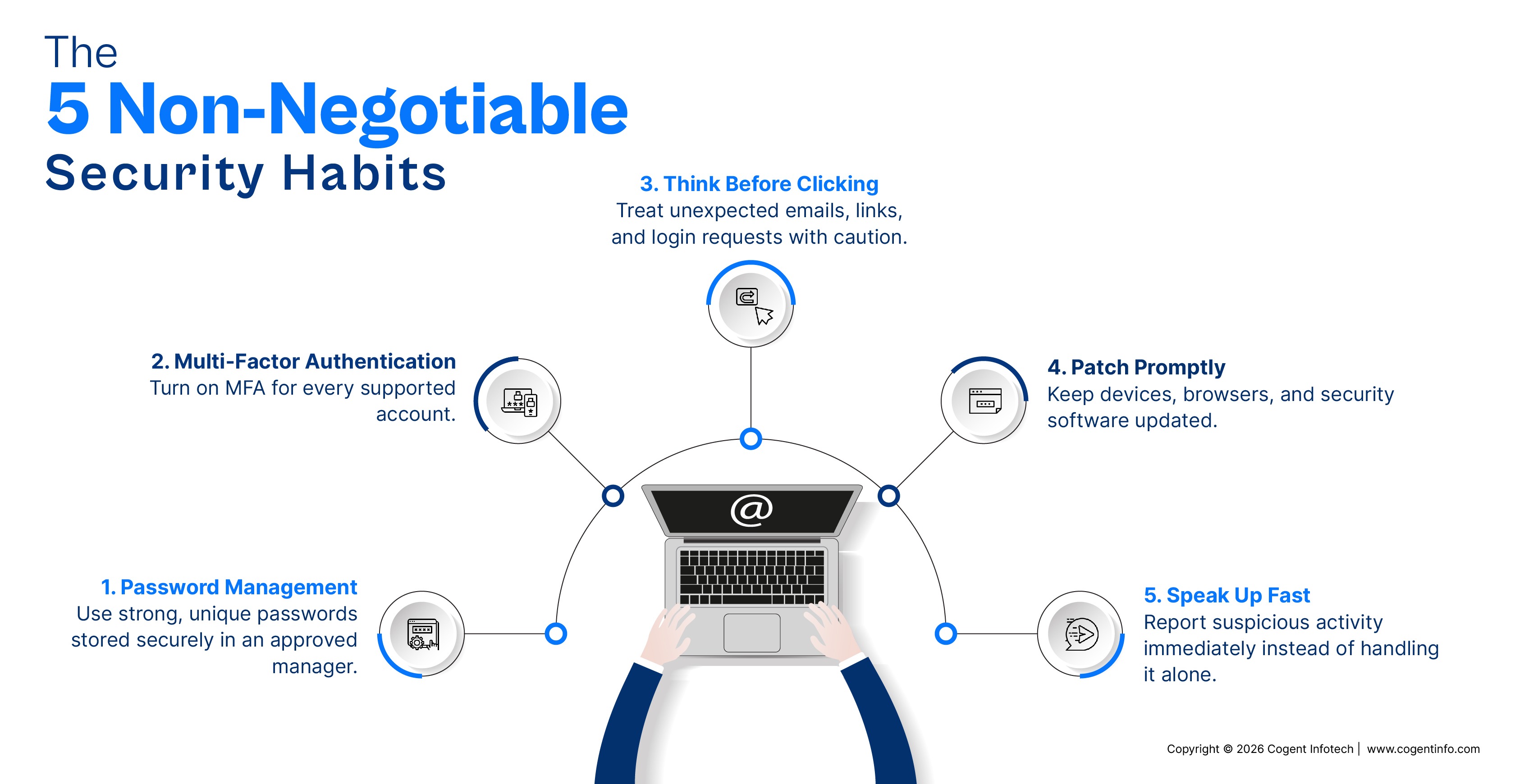
If you only remember five things this October, make them these:
- Use strong, unique passwords and store them in a password manager.
- Turn on multi-factor authentication (MFA) for every account that supports it.
- Treat unexpected emails, links, attachments, and login requests with caution. Pause, verify, then act.
- Keep devices, browsers, apps, and security software updated.
- Report suspicious activity quickly instead of handling it alone.
Introduction: Cybersecurity Is Everyone's Responsibility
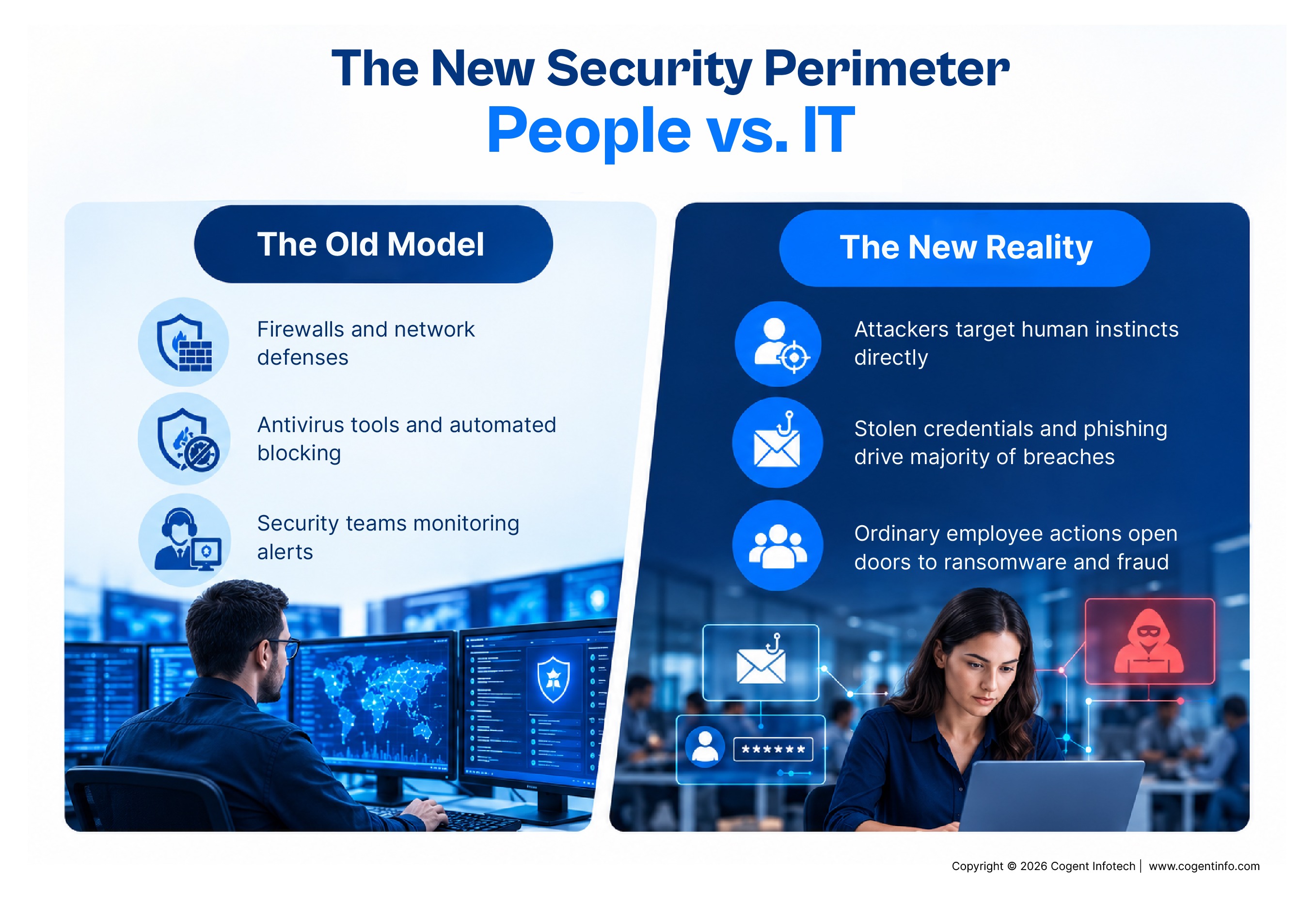
For years, cybersecurity was seen as the IT department's job: firewalls, antivirus tools, and a team monitoring alerts. That model no longer holds. Attackers know the most efficient way into an organization is often through a person, not a technical weakness.
Most incidents begin with ordinary moments. An employee enters credentials on a fake login page. A password reused from a personal account surfaces in a breach database. A laptop with postponed updates joins a hotel network. A file meant for one colleague goes to someone with a similar name. Each can open the door to ransomware, data theft, or fraud.
The scale is well documented. Verizon's Data Breach Investigations Report has repeatedly found that the human element, including stolen credentials, phishing, and simple errors, plays a role in a majority of breaches. The FBI's Internet Crime Complaint Center (IC3) reports that Americans lose billions of dollars each year to online crime, with phishing and business email compromise among the costliest schemes.
That is why Cybersecurity Awareness Month, led by CISA and the National Cybersecurity Alliance, is observed every October in the US. Its goal is not to create more security experts but to turn awareness into everyday behavior. This guide builds on CISA's fundamentals and adds habits that reflect how people work in 2026: hybrid schedules, cloud tools, and AI-powered scams.
10 Security Habits Every Employee Should Build
1. Use Strong, Unique Passwords for Every Account
Weak or reused passwords are among the easiest things for attackers to exploit. When a website is breached, stolen email and password pairs are traded and tested against hundreds of other services in an automated attack called credential stuffing. If your fitness app password is also your work password, a breach at a company you've never heard of can become a breach at yours.
Length matters more than complexity. A passphrase of four or more unrelated words is harder to crack than a short string of substituted characters, and easier to remember. Avoid birthdays, pet names, hometowns, or your employer's name, and never use slight variations like "Summer2026!" across accounts.
Nobody can memorize dozens of unique passwords. A password manager generates, stores, and fills them for you, so you remember only one strong master passphrase. Use the one your organization approves, since it may offer shared vaults and breach alerts.
Employee action: Create a unique password for every account, use your approved password manager, and never reuse work and personal passwords.
2. Turn On Multi-Factor Authentication
Even strong passwords can be stolen through phishing, malware, or breaches. MFA keeps a stolen password from becoming a stolen account by requiring something more: an authenticator app code, a prompt on a trusted device, a biometric check, or a physical security key.
Not all MFA is equal. Authenticator apps and hardware keys are generally stronger than text message codes, which can be intercepted through SIM-swapping. Enable MFA on personal accounts too, especially email, banking, and cloud storage, since a compromised personal email can be used to reset passwords everywhere else.
Watch for MFA fatigue attacks, where an attacker with your password triggers repeated push notifications hoping you'll approve one out of annoyance. Others call while pretending to be IT support and ask for your code. If you receive an MFA request you didn't initiate, deny it, change your password, and report it. Never share an MFA code with anyone.
Employee action: Enable MFA wherever available, prefer app-based or key-based methods, and treat every unexpected prompt as a warning sign.
3. Think Before You Click
Phishing works because it targets human instincts: urgency, curiosity, fear, and the desire to be helpful. Common warning signs include:
- Unexpected urgency or threats ("Your account will be suspended in 30 minutes")
- Sender addresses that mimic a real domain with a small change
- Unexpected links or attachments, or links whose destination doesn't match the text
- Requests for passwords, payments, sensitive data, or MFA codes
- Messages that appear to come from executives, coworkers, or vendors, such as a "CEO" asking for gift cards
Phishing isn't limited to email. It arrives by text (smishing), phone (vishing), collaboration tools like Teams or Slack, QR codes, and fake recruiter messages on social platforms.
Employee action: Pause, verify, report. Confirm the request through a separate, trusted channel such as a known phone number, then report it through your organization's process. You can also report fraud to the FTC at ReportFraud.ftc.gov or internet crime to the FBI's IC3 at ic3.gov.
4. Keep Devices, Apps, and Software Updated
Update notifications are easy to dismiss, but many are security fixes. Once a vulnerability is public, attackers move quickly against any unpatched system. CISA maintains a catalog of known exploited vulnerabilities precisely because attackers rely on unpatched software, and many of the listed flaws have had fixes available for a long time.
Think beyond your operating system. Browsers and extensions, collaboration apps, phones and tablets, VPN clients, security software, and home routers all need regular patches. Enable automatic updates where your organization permits, and restart when prompted. A five-minute restart is far cheaper than recovering from a compromised device.
Employee action: Don't postpone security updates. Turn on automatic updates, restart promptly, and contact IT if a device is blocked from updating.
5. Protect Your Work Device, Even When You're Away
Hybrid and remote work have moved company data far beyond the office walls. Your laptop or phone may hold email, customer information, and access to internal systems. Build simple habits:
- Lock your screen whenever you step away, at the office, at home, or in a shared space.
- Never leave devices visible in a parked car, in checked luggage, or unattended.
- Be mindful in public places, where others may watch your screen or overhear calls.
- Don't let family or friends use your work device.
- Never disable encryption, endpoint protection, screen-lock policies, or remote-wipe capabilities.
If a device is lost or stolen, report it immediately. The faster your security team can lock or wipe it, the lower the risk.
Employee action: Treat your work device as a business asset. Lock it, secure it, and report it right away if it goes missing.
6. Be Careful With Public Wi-Fi and Untrusted Networks
On unsecured or poorly managed networks, attackers may monitor traffic, redirect users to fake sites, or set up rogue hotspots that look legitimate. Practical precautions:
- Save confidential tasks for a trusted connection when you can.
- Use your organization's approved VPN whenever you're away from a trusted network.
- Verify the exact network name with staff, since attackers create lookalikes such as "Airport_WiFi_Free."
- Never turn off your firewall, VPN, or protection software to get connected.
- Consider your phone's personal hotspot, which is often safer than an open network.
Employee action: Assume any public network is untrusted. Use approved tools, confirm the network, and never weaken your device's protections for convenience.
7. Handle Sensitive Information With Care
Security isn't only about stopping hackers. A significant share of exposure comes from everyday handling: a spreadsheet sent to the wrong recipient, a customer file saved to a personal drive, a document shared with "anyone with the link."
Know how your organization classifies information. Customer data, employee records, financial information, contracts, source code, and strategic plans typically deserve extra care. If you're unsure, treat it as sensitive and ask. Share only with people who have a genuine business need.
Double-check recipients before sending, especially when autofill offers similar names. Use approved platforms for storing and sharing data, and avoid moving work files to personal email or cloud storage, even as a shortcut. Shred documents when required, and watch what you say in public places.
Employee action: Before sharing, ask: does this person need it, and am I using an approved method? If either answer is "no" or "not sure," pause and check.
8. Don't Trust Unexpected AI-Generated or Highly Convincing Messages
This habit most clearly separates today's threats from those of a few years ago. Generative AI lets attackers produce convincing content cheaply and at scale, so the old advice to look for typos is no longer reliable. Attackers now use AI for:
- Polished phishing emails with flawless grammar and professional formatting
- Personalized messages built from public information about your role and company
- Realistic fake invoices, vendor notices, and internal announcements
- Impersonation of a colleague's or executive's writing style
- Voice cloning and deepfake video, which the FBI has warned criminals use to commit fraud
Familiarity is no longer proof. A voice that sounds like your manager may not be your manager. That doesn't mean distrusting every message; it means appearance alone can't establish trust.
The strongest defense is a consistent step: confirm unusual requests through a separate, trusted channel. If an email requests a wire transfer, call the requester on a known number. If a video call includes an urgent request to move money or share data, pause and verify. Some organizations use callback procedures or verification phrases for high-risk requests.
Employee action: Verify unusual requests involving money, credentials, sensitive data, or urgency. Be most skeptical when you're being rushed.
9. Use Approved Tools and Report Incidents Quickly
Two habits belong together: working within your organization's guardrails and speaking up fast when something goes wrong.
Shadow IT, meaning software used without IT's approval, creates blind spots security teams can't protect. Unvetted tools may lack security controls or store data in unknown locations. Don't install unauthorized apps or browser extensions, and don't paste confidential content into public AI chatbots or unvetted online converters. If a tool you need isn't approved, ask. Requesting one is far better than working around the rules.
Report suspicious emails, accidental data sharing, lost devices, unexpected MFA prompts, and unusual account activity as soon as you notice them. Security teams can often limit damage if they hear within minutes or hours; if they learn days later, attackers may already have moved through the network. Organizations that treat prompt reporting as responsible behavior, not something to punish, catch incidents sooner.
Employee action: Use only approved tools, keep company data out of unapproved services, and report anything unusual immediately, even if you're not sure it matters.
10. Make Security a Habit, Not a Once-a-Year Training
Annual training is a useful start, but awareness fades without reinforcement. Threats change quickly, and habits slip when no one is reminding us. Build regular, lightweight check-ins:
- Review account security settings and confirm MFA and recovery options are current.
- Sign out of devices and sessions you no longer use or don't recognize.
- Complete required training on time, treating it as a chance to learn current threats.
- Follow security team bulletins and trusted sources such as CISA.
- Revisit policies when your role, tools, or projects change.
- Share what you learn. When you spot a phishing attempt, tell your team.
Training completion is a milestone. Daily behavior is what actually reduces risk.
A Simple Employee Security Checklist
Print it, pin it near your desk, and run through the relevant question the next time you hesitate. That moment of hesitation is exactly what the habit is designed to catch.
What to Do If You Think You've Made a Security Mistake
Everyone makes mistakes. What matters is how quickly and calmly you respond.
- Stop the activity. Don't enter more information or try to fix it on your own.
- Don't delete evidence. Keep the suspicious email, message, or file unless IT says otherwise.
- Disconnect the device from the network if your policy requires it.
- Contact IT or security immediately, sharing what you clicked, when, and what may have been exposed.
- Follow their instructions for resetting credentials and securing accounts.
Fast reporting makes an incident far easier to contain. Nobody expects perfection. They expect you to speak up.
Conclusion: Small Habits Can Make a Big Security Difference
Cybersecurity isn't about turning employees into experts. It's about simple, repeatable habits: pause before clicking, verify unusual requests, protect credentials and data, keep devices updated, and report concerns quickly. Each takes seconds, yet together they can stop the incidents that cost organizations the most, from stolen credentials and fraudulent payments to ransomware and data exposure. With AI making attacks more convincing, consistency matters more than perfection.
At Cogent Infotech, we believe security is an organization-wide responsibility. It takes sound technology, clear processes, and people equipped to make good decisions every day. We help US organizations strengthen their technology foundations and build security-conscious, resilient teams.
To learn how Cogent Infotech can support your security and workforce goals, get in touch with our team.
FAQs
What is the most important cybersecurity habit for employees?
No single habit covers everything; each closes gaps the others leave open. If you're starting out, begin with a password manager and MFA, then build the habit of pausing before you click.
How can I tell if an email is phishing?
Look for urgency, unexpected requests, suspicious links or attachments, unusual sender addresses, and requests for sensitive information. Because AI-written scams can look flawless, don't rely on spotting typos. Verify through a separate, trusted channel.
Should I report a suspicious email if I'm not sure it's malicious?
Yes. Security teams would rather review a false alarm than miss a real threat, and employee reports often help them spot broader campaigns.
What should I do if I accidentally click a suspicious link?
Stop interacting with the page, don't enter information, and report it promptly. If you entered credentials, tell your security team right away so they can secure your account.
Why is cybersecurity important for every employee?
Everyday actions involving accounts, devices, data, and communication affect the organization's overall security. Attackers target people as often as systems, so every employee is part of the defense.

