How to Identify Security Threats in Source Code



How to Identify Security Threats in Source Code
Security threats rarely appear out of nowhere. In most cases, they begin as small decisions inside the source code: a missing permission check, an unsafe database query, a hardcoded API key, an exposed error message, or a file upload feature that trusts user input too much.
That is why source code security review is one of the most important practices in modern software development. It helps teams identify weaknesses before attackers can exploit them. OWASP describes secure code review as the process of manually examining source code to find security vulnerabilities that automated tools may miss, especially issues related to application logic, data flow, and implementation details.
Identifying security threats in source code is not just about running a scanner and fixing whatever it reports. Real security review requires understanding how the application works, how data moves through it, where trust is assumed, and how an attacker might abuse normal functionality.
This guide explains how to identify security threats in source code using a practical, structured approach.
What Are Security Threats in Source Code?
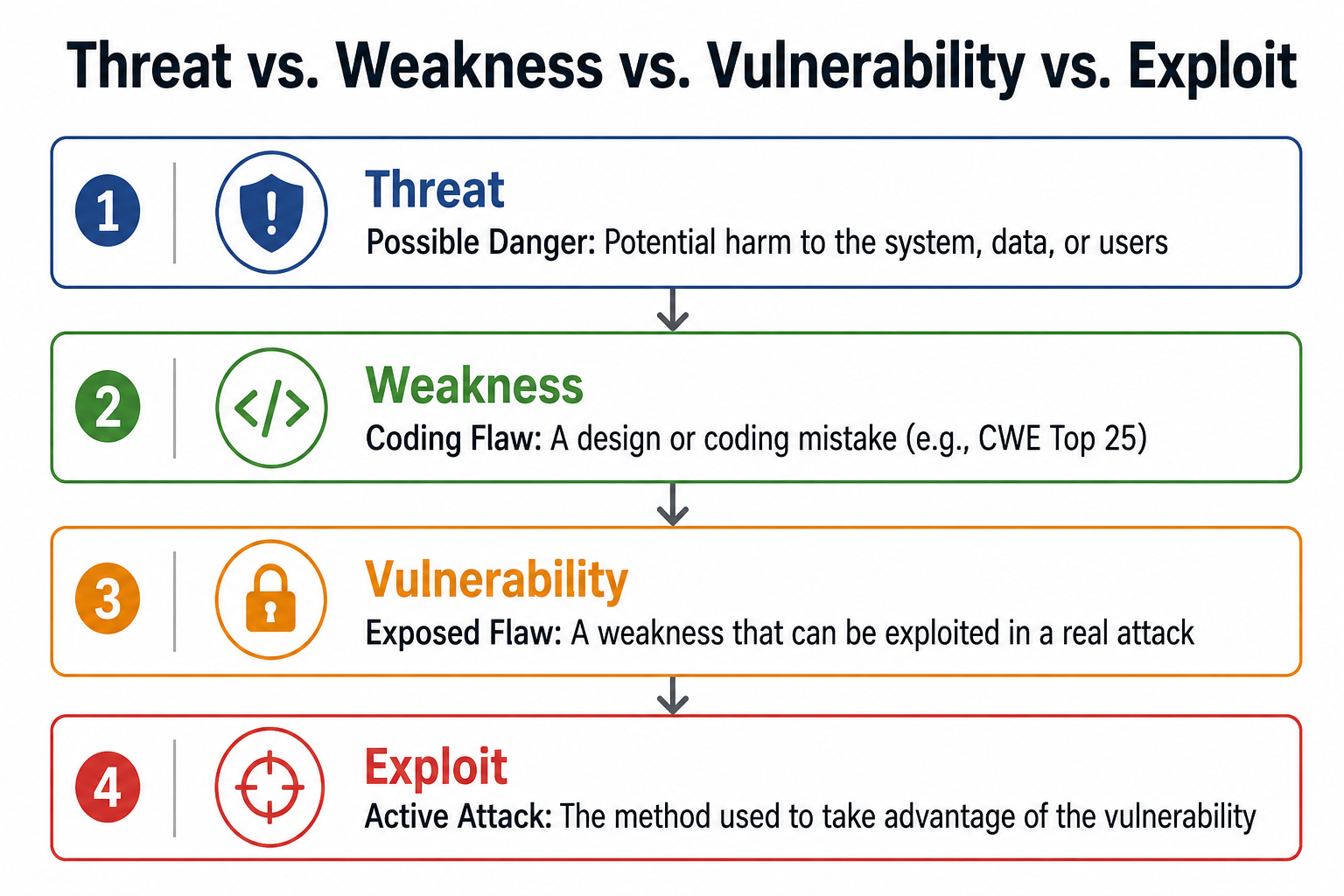
A security threat in source code is any condition that could allow an attacker to harm the application, its users, or its data. That harm could include stealing information, bypassing permissions, taking over accounts, injecting malicious commands, disrupting services, or manipulating business logic.
It is useful to understand the difference between a threat, a weakness, and a vulnerability.
A threat is a possible danger to the system. A weakness is a coding or design flaw that makes the system less secure. A vulnerability is a weakness that can be exploited in a real attack. An exploit is the actual method used to take advantage of that vulnerability.
For example, a login form is not automatically vulnerable just because it accepts usernames and passwords. But if the code does not limit repeated login attempts, an attacker may be able to conduct a brute-force attack. If password reset tokens are predictable, an attacker may be able to take over accounts. If user input is inserted directly into a database query, the application may be exposed to injection attacks.
MITRE’s CWE Top 25 list focuses on common and dangerous software weaknesses that often underlie real-world vulnerabilities, making it a useful reference for understanding which coding mistakes deserve attention during review.
Start by Understanding the Application
Before reviewing individual lines of code, you need to understand what the application does and what must be protected. Security review without context often becomes a checklist exercise. Expert-level review starts with architecture, data flow, and business risk.
Begin by identifying the application’s most important assets. These may include user accounts, passwords, session tokens, payment data, personal information, admin functions, business rules, API keys, cloud credentials, internal services, and database records.
Next, map the application’s entry points. An entry point is any place where data enters the system. Common examples include login pages, signup forms, API endpoints, search fields, file uploads, webhooks, admin dashboards, mobile app requests, command-line arguments, third-party integrations, and background jobs.
After that, identify trust boundaries. A trust boundary is the point where data moves from an untrusted area into a trusted part of the system. Data from browsers, mobile apps, third-party APIs, uploaded files, cookies, headers, and query parameters should never be trusted automatically.
A strong security reviewer constantly asks: “Where does this data come from, who controls it, and what could happen if it is malicious?”
Review Input Validation and Data Flow
Many source code vulnerabilities occur when untrusted input is passed to a sensitive operation without proper validation, sanitization, or encoding. That is why data flow review is one of the most important parts of identifying security threats in code.
Start by tracing data from its source to its destination. The source is where input enters the application. The destination, often called a sink, is where that data is used in a sensitive operation.
Sensitive sinks include SQL queries, NoSQL queries, operating system commands, HTML rendering, file paths, redirects, authentication checks, authorization decisions, deserialization functions, logging systems, and external API calls.
For each data flow, ask these questions:
Is the input validated on the server side? Are length limits applied? Are only expected characters or values allowed? Is the input converted to the correct type before use? Is it passed to a database query, a shell command, a template, or a file path? Is output encoded before being displayed in the browser?
Dangerous patterns include user input being added directly to SQL queries, raw HTML being rendered in the browser, uploaded filenames being used as file paths, user-controlled URLs being used for redirects, and request parameters being passed to system commands.
Good validation should be strict and intentional. In most cases, allowlists are safer than blocklists. Instead of trying to block every dangerous character, define exactly what valid input should look like. For example, a role field should only accept known roles. A quantity field should only accept a reasonable positive number. A redirect URL should only point to approved destinations.
The goal is simple: untrusted data should not be able to control sensitive behavior.
Check Authentication and Authorization Logic
Authentication and authorization are two of the highest-risk areas in any codebase.
Authentication answers the question: “Who is this user?” Authorization answers: “What is this user allowed to do?”
Many teams review authentication but underestimate authorization. That is a serious mistake. OWASP identifies broken access control as a leading web application security risk category, including issues such as users accessing data or functions outside their intended permissions.
When reviewing authentication code, look for weak password handling, insecure password reset flows, missing login rate limits, predictable tokens, long-lived sessions, insecure cookies, and tokens stored in unsafe locations. Session cookies should use secure attributes such as HttpOnly, Secure, and appropriate SameSite settings. Passwords should never be stored in plaintext or encrypted with reversible encryption. They should be hashed using a strong password hashing algorithm.
Authorization review requires even more attention. Look for admin routes without server-side checks, users being able to access other users’ records by changing IDs, frontend-only permission controls, missing tenant isolation, and inconsistent role checks across endpoints.
For example, consider this endpoint:
/users/1234/invoices
If a logged-in user can change 1234 to another user’s ID and view their invoices, the application has an access control vulnerability. The user may be authenticated but is not authorized to access that object.
A good rule is this: every sensitive action should verify permissions on the server side, close to the action being performed. Never rely only on hidden buttons, frontend checks, or client-side roles.
Look for Common Vulnerability Patterns
Although every application is different, many source code security threats follow familiar patterns. Knowing these patterns helps reviewers find risks faster.
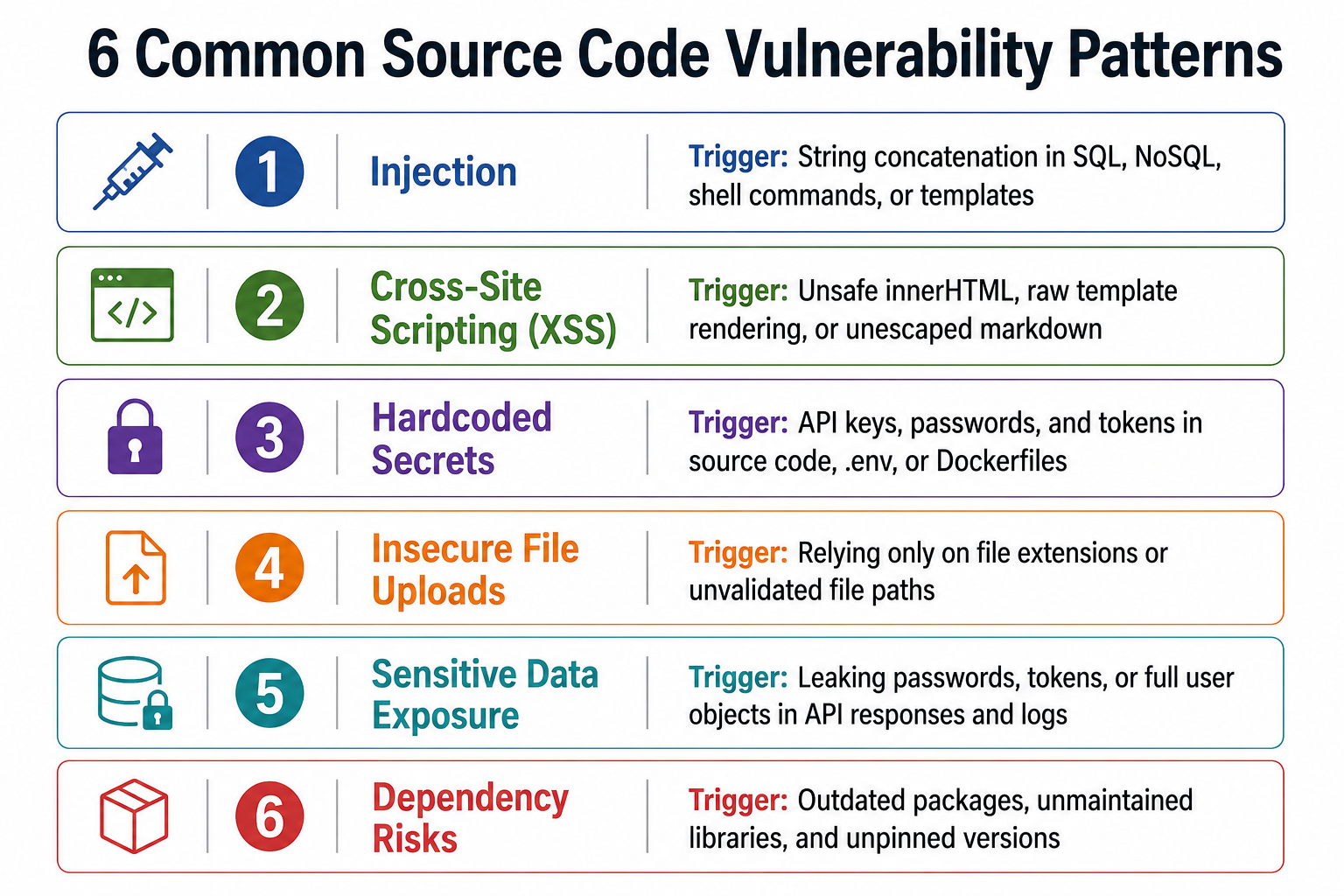
Injection
Injection occurs when untrusted input is interpreted as part of a command, query, or expression. SQL injection is the classic example, but injection can also affect NoSQL queries, operating system commands, LDAP queries, templates, and expression languages.
Look for string concatenation in queries, dynamic filters built from request parameters, user input passed into shell commands, and unsafe template rendering. The safer approach is to use parameterized queries, prepared statements, strict allowlists, and framework-supported escaping.
Cross-Site Scripting
Cross-site scripting, or XSS, happens when attacker-controlled content is rendered in a browser as executable code. Look for unsafe use of innerHTML, raw template rendering, markdown rendering without sanitization, user-controlled attributes, and untrusted content displayed in admin panels or notification systems.
Even modern frontend frameworks can be misused. Watch for escape hatches that disable automatic encoding.
Hardcoded Secrets
Secrets should not live in source code. Search for API keys, database passwords, OAuth secrets, private keys, cloud credentials, tokens, and webhook signing secrets. These often appear in configuration files, test files, Dockerfiles, CI/CD scripts, .env files, and old commits.
Secret scanning should be part of the development workflow, but manual review is still useful because secrets are often hidden in unusual places.
Insecure File Uploads
File upload features are high-risk because they allow users to send content directly into the application environment. Review file type validation, file size limits, file name handling, storage permissions, malware scanning, and whether uploaded files can be executed.
Do not trust file extensions alone. A file named image.jpg may not actually be a safe image. Also check for path traversal risks, where filenames like ../../config.env could be used to access or overwrite sensitive files.
Sensitive Data Exposure
Sensitive data can leak through logs, URLs, error messages, API responses, analytics events, browser storage, cache headers, and debug pages. Look for passwords, tokens, personal information, payment data, and internal system details being exposed unnecessarily.
A common issue is returning too much data from an API. For example, a profile endpoint may only need to return a user’s name and avatar, but the code may return the full user object, including internal IDs, roles, email verification status, or security settings.
Dependency Risks
Modern applications rely heavily on third-party libraries. That makes dependency review essential. Look for outdated packages, vulnerable components, unmaintained libraries, unpinned versions, suspicious packages, and unnecessary dependencies.
The OWASP Top 10 includes vulnerable and outdated components as a major security risk category, highlighting the importance of keeping dependencies up to date and reviewed.
Review Configuration and Environment Files
Security threats are not always found in business logic. Many serious issues come from insecure configurations.
Review environment files, deployment scripts, Dockerfiles, cloud configuration, CI/CD pipelines, web server settings, and infrastructure-as-code files.
Look for debug mode enabled in production, verbose error messages, wildcard CORS policies, disabled TLS verification, public storage buckets, default credentials, exposed environment variables, overly broad cloud permissions, insecure cookie settings, and containers running with unnecessary privileges.
A well-written application can still be exposed if the surrounding configuration is weak. For example, a strong authentication code will not protect an admin panel that is accidentally exposed to the public internet without proper network restrictions.
Security review should include both the application code and the environment in which it runs.
Use Automated Tools, But Do Not Depend Only on Them
Automated tools are useful and should be part of every secure development workflow. Static Application Security Testing tools can detect risky coding patterns. Software composition analysis tools can identify vulnerable dependencies. Secret scanners can catch leaked credentials. Infrastructure scanners can detect cloud and deployment misconfigurations.
However, tools cannot understand every business rule or attack path. They may not know that a refund should only happen once, that a tenant should never access another tenant’s records, or that changing an order status should require manager approval.
Automated tools are especially weak at detecting business logic flaws, broken object-level authorization, multi-step workflow abuse, and feature misuse. That is why manual review remains essential. OWASP’s secure code review guidance specifically emphasizes that manual review can identify vulnerabilities that automated tools often miss.
The best approach is not manual review versus automated scanning. The best approach is both. Let tools catch repeatable patterns quickly, and let human reviewers focus on context, logic, permissions, architecture, and abuse cases.
Prioritize and Document Security Findings
Not every issue has the same level of risk. A missing security header and a broken authorization check should not be treated equally. After identifying possible threats, prioritize them based on impact and exploitability.
Consider what data is exposed, whether the vulnerable feature is internet-facing, how easy the issue is to exploit, what privileges are required, how many users are affected, and what business damage could occur.
A useful security finding should include the affected code location, a clear explanation of the issue, a realistic exploit scenario, the potential impact, severity, recommended fix, and steps to verify the fix.
For example, instead of writing “authorization issue in invoice endpoint,” a stronger finding would say:
“The invoice endpoint accepts a user-controlled account ID and returns invoice data without verifying that the authenticated user owns that account. An attacker with a normal account could modify the ID parameter to access another customer’s invoices. The fix is to enforce object-level authorization on the server side before returning invoice data.”
Good documentation makes security findings actionable. It helps developers understand not just what is wrong, but why it matters and how to fix it correctly.
Build Security Review Into the Development Process
The best time to identify security threats is before code reaches production. Security review should be built into the software development lifecycle, not added as a final step before release.
NIST’s Secure Software Development Framework recommends integrating secure software practices into development processes rather than treating security as a separate activity.
During design, teams should identify sensitive data, define trust boundaries, and clarify authorization rules. During development, developers should follow secure coding practices, validate input, avoid hardcoded secrets, and write security-focused tests. During pull requests, reviewers should pay extra attention to authentication, authorization, payments, file uploads, cryptography, dependencies, and configuration changes.
Before release, teams should combine manual review with automated scanning, dependency checks, abuse-case testing, and verification of logging and monitoring.
Security is strongest when it becomes part of everyday engineering culture.
Conclusion
Identifying security threats in source code is about finding places where the application trusts too much.
It may trust user input, request parameters, uploaded files, third-party APIs, browser-side checks, internal services, dependencies, or configuration defaults. A good reviewer challenges those assumptions.
To review source code effectively, start by understanding the application. Identify important assets, map entry points, trace data flows, verify authentication and authorization, look for common vulnerability patterns, review configurations, use automated tools, and document findings clearly.
The best security reviewers do not just read code line by line. They follow the data, verify permissions, question assumptions, and consider how normal features could be abused.
Secure code review is not only about preventing attacks. It is about building software that deserves trust.
Build secure software with confidence. Discover how Cogent Infotech can help you embed security into every phase of the software development lifecycle. Talk to our cybersecurity experts today.